 |
Roboteam AI
|
|
Roboteam AI
|
Here is some general non-technical advise when working on the code base, which is applicable for any software developer at any company. When writing code you should take the following points into account:
Code base documentation is very important when writing code, because:
Keep in mind that documentation is different than comments. Comments are placed between code lines in the source file, whereas documentation is placed in the header file before function and class definitions. Good code should be self-explanatory which means that it often does not need any comments, when properly split into smaller functions that have been well-documented. And when writing comments, it should mostly be used to answer the why questions rather than the what questions, i.e. comments should focus on why does this part of code work, why don't I have to check certain situations, etc. rather than what the code actually does. Documentation on the other hand can be used to explain what the code does, but should also be used to explain why this code works. Documentation should give an answer to the most important questions regarding the code which can include answers on questions like:
Below is an example how you should document your code:
Note that this documentation gives a clear description of what the code does, by explaining what happens for each situation. But besides that it also explains why this code works, by telling that the function knows how to deal with parallel & point cases and that you don't have to check if line.end is on the line if start, end and line.start are not on both lines.
Below is an example how you should not document your code:
The documentation basically tells the same as the name of the function. Hence the goal of documentation, to inform others about usage, is missing here. What kind of info is computed is totally unclear? What are requirements for calling this function is also missing? When should this function be called?
Having a good code design is very important, because:
Before introducing new features you should discuss with your fellow software developers how you expect the structure of the code that implements these features will look like, since different developers have different opinions about this and they also have to work with it. The following points can help you to find an optimal design for your code:
A good place to start when inexperienced with code design is design patterns. Design patterns are quite useful to know as software developers and are applicable to almost any programming language. Design patterns tell you in general how to deal with common types of problems in code design, which can be re-used or guide you in finding a proper design for your situation. A list of all design patterns can be found at https://sourcemaking.com/design_patterns. The most important design patterns to know are: Factory Method, Singleton (although should only be used in a few case), Adapter, Composite, Decorator, Facade, Command, Iterator, Observer, State, Strategy, Template Method.
A problem that is quite common in programming is how to pass your information from classes to other classes. There are a lot of different approaches for this and you should be familiar with these approaches and select the right approach for your situation. To better illustrate these approaches, we use as example the Chip skill (chipping is shooting the ball through air). The Chip skill inherits from the Skill interface and for the Chip skill we need to know with which zSpeed the ball should be launched. We will show how data is passed for the Chip skill with each of these approaches.
Pass by Constructor is a quite common practice within the software community, which is a technique where you pass information to the class using its constructor, so when the class is created. In case of the Chip class you will pass the zSpeed as information when the Chip class is created. In a class diagram this solution looks like:
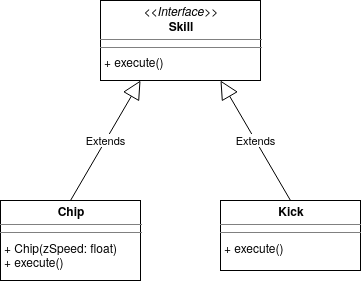
And from a caller perspective it looks like:
The pros of this solution is that you enforce that all information that is needed is passed before the corresponding method is called. Furthermore no other class is enforced to use the same parameters if they do not need it. However a clear disadvantage is that information has to be passed when the class is created (which is not always possible) and often the created class can only be used once. For example if we want to Chip with a different zSpeed then we need to create a new Chip class. Although this sound quite complicated, it is a quite common practice to create classes that are only used once.
Pass by Interface Method means that you pass the information by the method inherited from a commonly used interface. In this example we know that the Chip class inherits from the Skill interface. So to pass zSpeed as information, we need to adjust the execute method in the Skill interface such that it uses zSpeed as parameter. In a class diagram this solution looks like:
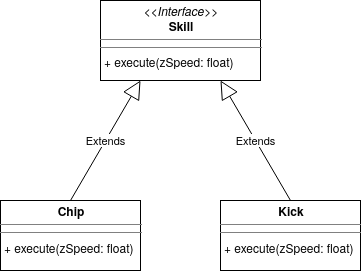
And from a caller perspective it looks like:
The pros of this solution is that it is a quite simple design. Furthermore you can use the same class multiple times and you pass the information when the corresponding method is executed. The con of this solution is that all classes inheriting from this interface are enforced to use the same parameter even if they do not need it. For example Kick is a Skill where the ball is passed over the ground, so there is no need for passing zSpeed as parameter to this class. But with this solution you are enforced to still pass this value to the Kick class.
With the Pass by Interface Method technique you can also do more advanced stuff, like using optional arguments (https://en.cppreference.com/w/cpp/utility/optional) or using null values in case some information is not needed. Also you could pass a class as parameter that encapsulates the necessary data needed for skills, which looks like:
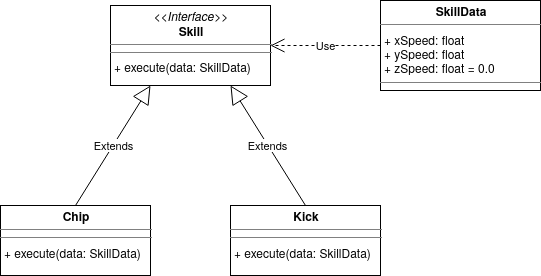
The advantage of this is that the class parameter could partially deal with the missing values, however a clear disadvantage is that this makes everything more complex than necessary. However if child classes are too different then they should not share the same interface. For example if there is a subgroup of classes that uses different parameters than other classes, they should inherit from a seperate interface. With an adapter pattern you can now substitute the new interface in the old interface, which in case of the Chipping example gives the following class diagram:
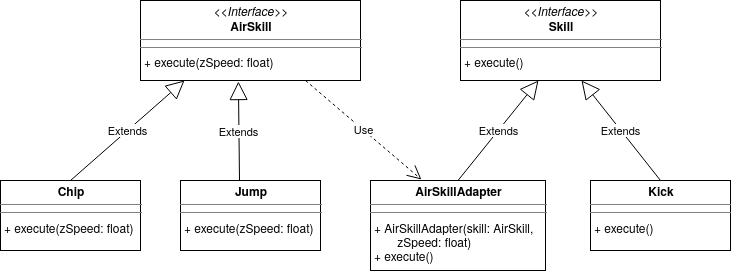
Where the implementation of the adapter class looks like:
The third solution is to Pass Information by Additional Method. This additional method is called a setter, which you can create per parameter that needs to be passed or you can have 1 setter function that sets all parameters at once. In a class diagram this solution looks like:
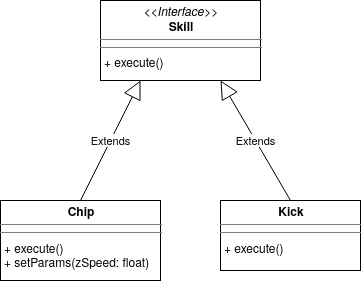
And from a caller perspective it looks like:
The pros of this solution is that you can pass the information at anytime rather than at the initialization of the class. Furthermore the same class can be used multiple times and you are not enforced to pass parameters to classes that do not need it. The con of this solution however is that it is much more complicated and it is not enforced to pass zSpeed now as parameter before calling execute as method, which also needs to have some exception handling for these cases. Therefore it is not advised to use this solution if either Pass by Interface Method or Pass by Constructor is already an appropriate solution. However in some cases you could combine it with Pass by Constructor to have more flexibility in changing the parameter at anytime, whereas you never have an undefined parameter value.
Magic values, assuming things don't change
Writing unit test cases for your code is very important, because:
When writing unit test cases, your goal is to create unit test cases that might/will fail, not unit test cases that will pass. Also you should be systematic in writing test cases, since using random unit test cases or just writing a few test cases will in most cases not find the most common type of bugs. Hence you should be systematic in writing unit test cases, for which there are 2 type of techniques: black-box testing and white-box testing. With black-box testing you only look at the specification and ignore the implementation. With white-box testing you also take a look at the implementation. Some black-box testing techniques are:
With this technique you split up your test cases logically up in multiple classes based on the input and/or output. For example in case of the intersection between LineSegments you split it up in: no intersection, 1 intersection, infinitely many intersections. And you can split it up in: parallel lines versus non-parallel lines. The Equivalence Partitioning method proposes you to pick a test cases such that every class is covered at least once. For example in this case you can create 3 test cases:
which will cover all classes at least once. Equivalence Partitioning is a quite suitable technique that ensures you to look at all different type of cases. More information about Equivalence Partitioning can be found at: https://en.wikipedia.org/wiki/Equivalence_partitioning
Boundary Value Analysis is often combined with Equivalence Partitioning. With Boundary Value Analysis you pick quite huge/small cases, e.g. using INT_MAX, FLT_MIN and vectors of maximum size as test input. Moreover you test input cases that are close to the regions where the output will change. If you apply Boundary Value Analysis on for example the path finding algorithm to the ball, then you can test the following cases:
When combined with Equivalence Partitioning you can test cases that are close to the class boundaries. For example in the LineSegment intersection case you can pick two LineSegments that are almost parallel. More information about Boundary Value Analysis can be found at: https://en.wikipedia.org/wiki/Boundary-value_analysis
The last black box testing technique is Error Guessing. With Error Guessing you try to find test cases that might fail. Examples of error guessing are computing the intersection between two LineSegments that are actually points and applying the path finding algorithm when the ball cannot be reached, because it is surrounded by enemy robots. With error guessing you can also look for input which might result in division by zero or taking the logarithm of zero. Also cases where for-loops and while-loops don't get executed at all are interesting for Error Guessing. Or using empty vectors/arrays as input will often result in good test cases as well. Important for Error Guessing is to think outside the box, because for Error Guessing it is less straightforward to find test cases than for Boundary Value Analysis and Equivalence Partitioning. Also it requires more experience than for the previous black box testing techniques. However Error Guessing will definitely help you to find bugs inside your code.
With white box testing you look at the implementation and check which part of the code get covered by the test cases. For this you can use these coverage metrices: statement coverage, (multiple) condition coverage, decision coverage, modified condition/decision coverage and path coverage. More information about these metrices can be found at: https://en.wikipedia.org/wiki/White-box_testing and https://en.wikipedia.org/wiki/Code_coverage. A general guideline is to have decision coverage with your test suite (group of unit test cases) for the method you test, which means that every if, for and while statement has been evaluated at least once to true and once to false. You could aim for even better coverage scores, by having multiple condition coverage, modified condition/decision coverage or path coverage, but make sure that your test suite does not become enormous by doing this.
Usually a combination of equivalence partitioning, boundary value analysis, error guessing and decision coverage ensures that all common type of bugs will be found. It is unfortunately never a guarantee that all bugs will be found, but you will definitely find more bugs than by just using a few test cases or using random test cases.
The last thing regarding to writing unit test cases is to always use your common sense, e.g.
Being consistent when writing code is important, because:
What I don't mean with consistency is: code style formatting, commit message guidelines, documentation guidelines, etc. which is also quite important, but being consistent in implementation and design of your code is even more important. Unfortunately there is no clear definition of consistency, however some important points regarding consistency are:
Important regarding consistency is that you should discuss a lot with your fellow software developers on which guidelines/definitions you will agree on.
 1.9.1
1.9.1